
Troubleshooting
This page lists some common issues you might have running JJ2+. Not finding your answer here? Let us know!
See also Known Issues.
Controller Issues
JJ2+ works with all the controllers that we have access to for testing, but there are many controller models out there. If you have trouble, please submit a bug report and include a screenshot or video of the results of the -joyinfo command line argument.
For example, if your JJ2+ installation is in C:\Games\GOGGALAXY\Jazz2Plus, open Command Prompt (cmd.exe) and type:
cd C:\Games\GOGGALAXY\Jazz2Plus
jazz2 -joyinfo
If you're using GOG Galaxy, you can edit command line options in Settings → Manage Installation → Configure → Features → Custom executables / arguments.
Pinging Server
If you host a server and it appears as "pinging" in the server list, you need to forward TCP ports 10052 and 10054.
Can't enter Full Screen
Close JJ2+ and open it again. On some computers, the option only appears the second time you run JJ2+.
Stuttering
If your game is stuttering more than you'd like with your unique monitor hardware, try changing the Max FPS numbers in plus.ini, which is generated the first time you run JJ2+.
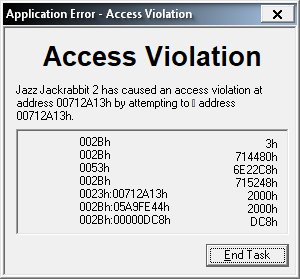 Bizarre Access Violation
Most Access Violation errors mention attempting to "read" or "write" a certain address. If your error attempts to □ instead, you need to exclude JJ2+ from Data Execution Prevention.
Windows 8 Fullscreen Slowdown
People who are still running Windows 8 say that JJ2 is very slow in fullscreen. This thread has some suggestions that we've not personally tested.
Other Operating System
JJ2+ is tested to run on Windows XP and above.
Community members report great success in Windows emulators like WINE, GameHub, Proton, and others. You can always ask for help figuring out how to use them.